Several months ago I was interviewing with various companies, primarily for senior web developer roles. In total I probably spoke with just under a dozen companies. Some had phone screens and some had in-person interviews. Some had written tests and some used white boards. My favorite of all the different interview approaches were the companies who asked me to build something. And of the companies who asked me to build something, my favorite was being asked to build Conway’s Game of Life (wikipedia link).
Before I get into Conway’s Life (the main thrust of this blog post), let me briefly comment on why open-ended assignments are the way to go when it comes to job interviews:
- Do you want to see how well someone can bullshit? Or do you want to see how well they can code?
- Assigning a project measures not only technical prowess, but dedication and interest in the position
- Instead of assessing how well someone will do on tasks tangentially related to the position, why not see how well they’ll actually do with something more real-world?
- Best of all, it’s fun
Of the three interviews in which I was given projects, two were open-ended. Of the two, my favorite one was this: “Build an implementation of Conway’s Game of Life”.
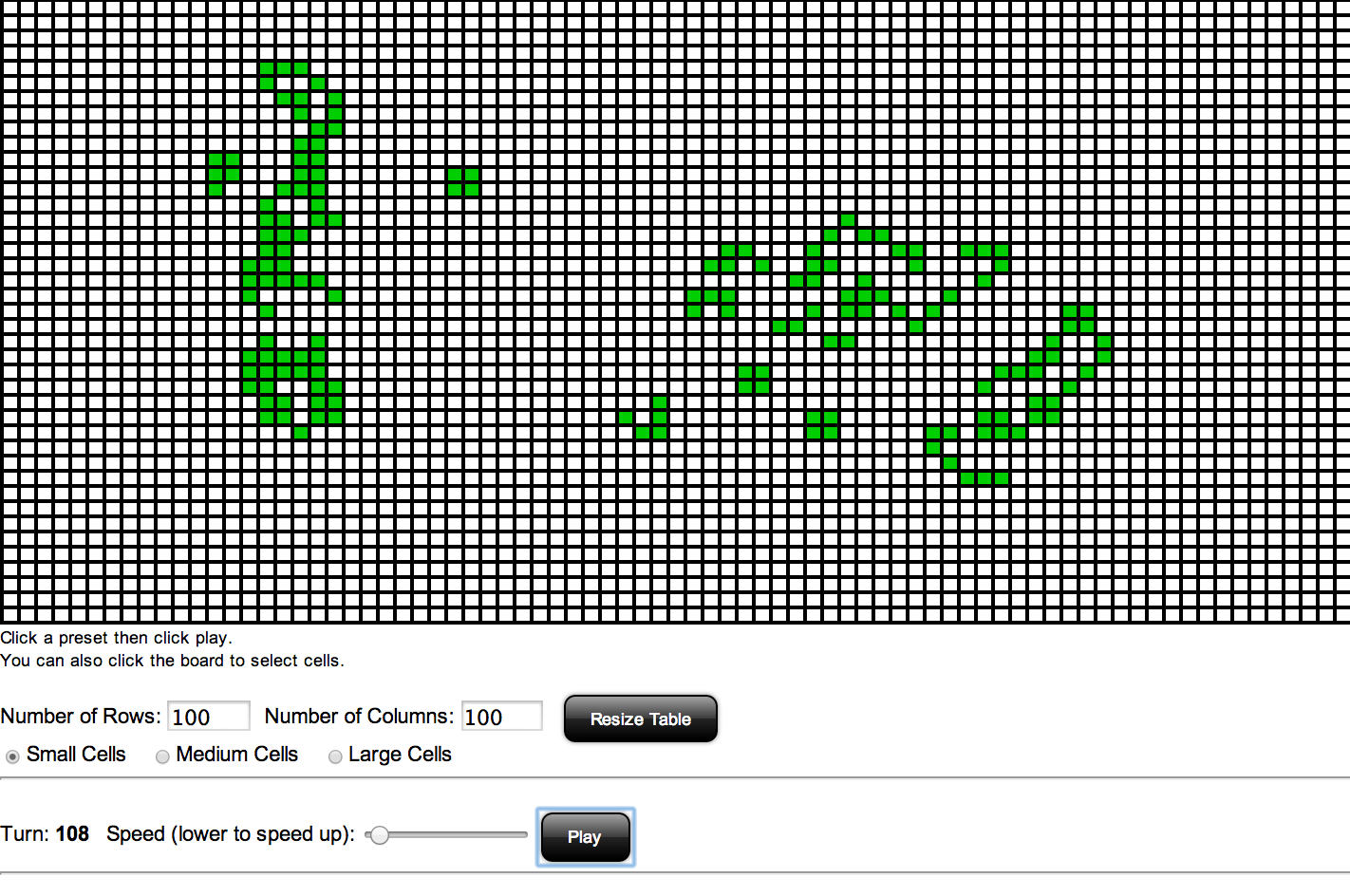
In a nutshell, Conway’s Life is a programming exercise in which a grid of cells is implemented. Each cell can be either on or off. The number of adjacent cells which are “on” determines whether or not a given cell is toggled on during each “turn”. This simple logic can result in fairly complicated patterns emerging from an extremely simple starting point.
My implementation was written in Javascript and HTML.
Check it out by visiting this page and clicking Play.
Here are a few interesting points about my design:
- I split the design into two modules. The life class implements an internal state of the Life board and the lifedom class handles exposing this state via the DOM.
- The animation in lifedom works by toggling the background of the table cells on and off. Originally, the animation was so fast that I actually needed to slow it down (via setTimeout) to create a more aesthetically appealing effect. I added a slider that lets you slow down or speed up the animation by changing the value of the timeout.
- I added unit tests. They make sense for the life class, less so for lifedom, so I got lazy as I added various bells and whistles to the latter.
- Because I originally wanted tests for lifedom, it lead me to a regrettable design decision: there is HTML in the javascript. I wanted to avoid duplication and only define the HTML of the game board once. Generally speaking, there are 3 ways to do this:
- Use PHP to define an HTML template to use in both the unit tests and the application. Pro: Easy. Con: Requires PHP.
- Use Javascript for the template. Pro: Easy. Con: Ugly. Clunky.
- Use Grunt to manage different builds for test versus production. Pro: Best pure javascript solution. Con: More complicated than the alternatives.
Performance
For me, the most interesting part of this project came shortly after I finished my first implementation. I decided to check it out on my 1st generation iPad Mini. The animation looked horrible. The “frame rate” was way too low and it looked visibly underpowered and stuttered. I tried reducing the timeout to try and speed things up, but this didn’t help: entire frames would be dropped and it still looked like shit.
It’s funny because I knew immediately how this would go down:
- I’d first trust my gut and try a quick fix
- This wouldn’t work so I’d get more analytical and go through looking for additional optimizations
- I would once again fail and resort to replacing the animation with canvas as a last ditch effort to get something that looked decent. I had no idea if this would work.
My first attempt at better performance was to replace .toggleClass(‘on off’) with direct manipulation of the backgroundColor property. My rationale was that this would avoid CSS repaints and perform better. I also added some caching of which cells were “on”, which avoided a jQuery find() operation. You can see the github changeset here.
I added some basic benchmarking to measure the impact (or lack thereof) of this change. I created a running counter of “turns per second” which turned out to be a great benchmark. The less the animation slowed down the program, the higher the turns per second would be.
To measure each change, I used the R-Pentomino pattern and grabbed my benchmark at turn 150, which represents a peak for the pattern in terms of the number of enabled cells in the pattern (and consequent steep drop in animation performance on the iPad Mini). By comparing the Baseline/Control stats against a Test Run that has all the animation suppressed (such that each turn is calculated in the life class but never displayed on-screen) you can see how much the animation itself actually slows things down.
Baseline/Control Stats
- Chrome on Macbook: 16tps
- iOS Simulator on Macbook: 16tps
- iPad Mini (1st generation): 5tps
- iPhone 5S: 14tps
Animation Disabled
- Chrome on Macbook: 19tps
- iOS Simulator on Macbook: 19tps
- iPad Mini (1st generation): 17tps
- iPhone 5S: 18tps
Next, we see the impact of my first attempt at improving the animation performance by replacing toggleClass(‘on off’) with backgroundColor. It helped, but not enough.
Classes Removed
- Chrome on Macbook: 18tps
- iOS Simulator on Macbook: 19tps
- iPad Mini (1st generation): 7tps
- iPhone 5S: 16tps
I tried some additional optimizations which didn’t really do much:
- Instead of turning the entire board off and then turning cells on, figure out which ones should remain on and don’t turn them off in the first place: commit.
- Keep the internal array state of life sorted so we iterate less: commit.
- Replace document.getElementById with a cache so it only gets called the first time: commit. This last change made a tiny difference, at least on the iPhone.
Cached DOM Lookups
- Chrome on Macbook: 18tps
- iOS Simulator on Macbook: 19tps
- iPad Mini (1st generation): 7tps
- iPhone 5S: 17tps
At this point, I knew my only hope of getting acceptable performance would be to drop the idea of using a